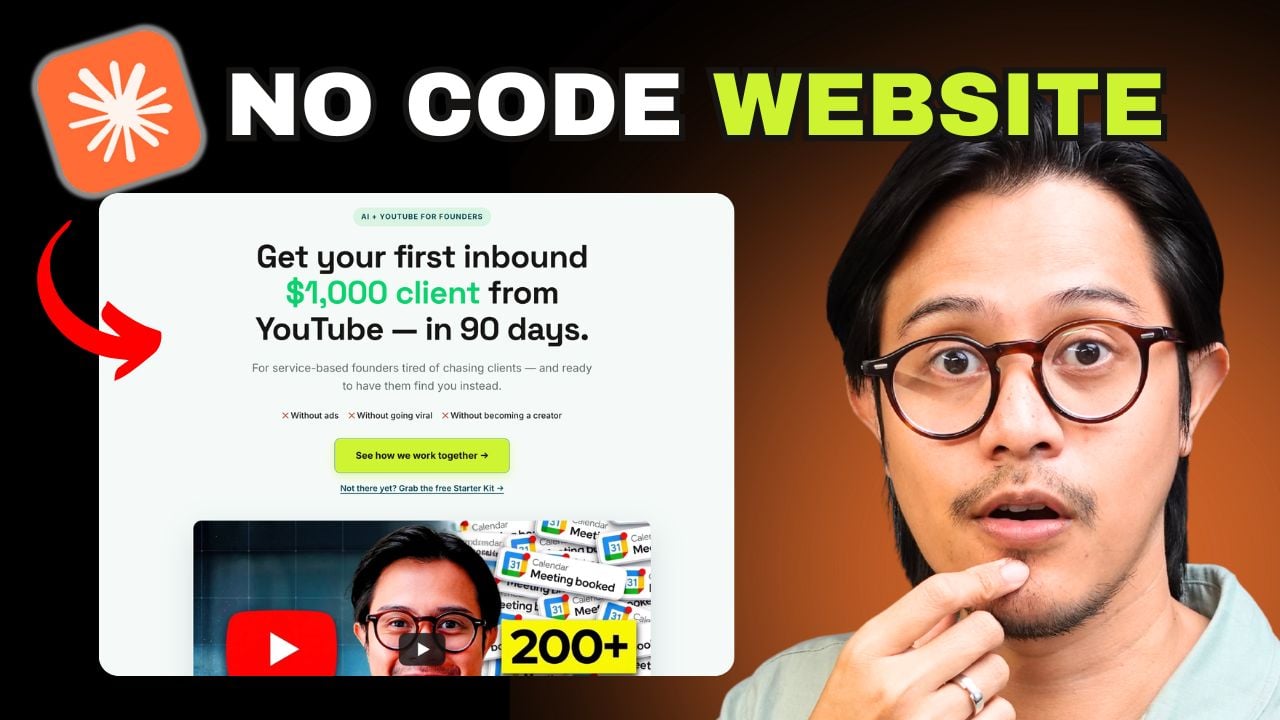
I just used Claude AI to build my entire website — homepage, work-with-me page, and about page — in under 30 minutes. No developer. No coding. And it saved me roughly $3,000 compared to hiring a freelancer to do the same thing.
The site isn't just good-looking. It's already pulling in the right people: service-based founders coming directly from my YouTube videos, landing on a page that explains exactly what I do and routes them to book a call. That's the part most content creators miss — they get views, but their website doesn't convert those viewers into leads because there's no clear offer, no proof, no next step.
Here's the full process — including the exact conversation I had with Claude, every fix I ran into, and the prompts I packaged into a free download so you can replicate this today.
Why Your Website Is the Missing Link Between Views and Clients
Here's what actually happens when someone discovers one of your videos. They don't book a call immediately — especially if they've just found you. What most of them do, after watching two or three videos and thinking "I kind of like this person," is Google your name or click the link in your bio to see if you're the real deal.
If there's a professional website with your name on it, a clear explanation of what you do, and real client testimonials — that trust check gets passed. If there's nothing, or something that looks thrown together, they move on.
After burning $15,000 on content marketing coaches trying to figure out why views weren't turning into clients, this was one of the missing links. YouTube gets people curious. The website converts that curiosity into a booking.
Step 1: Give Claude Full Context Before Touching a Single Page
Before You StartThe quality of your website depends almost entirely on the quality of context you give Claude upfront. Don't jump straight to "build me a website." Start by having a conversation about your business — who you help, what result you get them, what you're selling, and who your ideal client is.
If you're starting fresh, spend 10–15 minutes answering these questions in the chat first:
- Who do you help and what specific result do you get them?
- What are you selling, and at what price point?
- Who is your ideal client — job title, situation, what they're afraid of?
- What do you want visitors to do on each page? (book a call, download a resource, etc.)
- What's your colour palette? If you don't have one, go to Pinterest and search "modern minimalist website colour palette," find one you like, and paste the image directly into the chat.
The more specific you are here, the less back-and-forth you'll need later. Think of it like briefing a developer — except this developer never misunderstands you and never invoices you.
Step 2: Ask Claude to Build an HTML Mockup — Not a Wireframe
The Key InsightMost people who try to use AI to build a website make the same mistake: they get a description or a wireframe, then manually build it block by block in their website editor. That's still hours of work.
The better approach: ask Claude to build a working HTML mockup you can copy and paste directly into a single HTML code block in your builder. One paste. Entire page. Done.
Here's roughly what I asked:
"Last time you helped me with a website, you designed it, but then I had to go build it block by block — which is a giant pain. Why don't you just create a mockup and I'll copy the HTML code and paste it into my builder? Can we do something similar for my website overhaul?"
Claude immediately produced a working mockup for both the homepage and work-with-me page — already using my colour palette (Space Grotesk and Inter as the font pairing), my offer copy, and the right page structure. I didn't ask for any of those specifics. It pulled them from the context I'd already given it.
From there, I iterated with specific instructions, exactly like talking to a developer:
- "For the work-with-me page, replace this section with that."
- "My prices are X — update the pricing block."
- "The primary button should be this yellow. Here's my full colour palette — add more variety."
- "Embed this testimonial video. Use this photo of me for the hero section."
"Almost like you're talking to a developer — hey, put this here, put that there. That's exactly how you talk to Claude. And I don't have to say anything technical."
Step 3: Paste the HTML Into Your Website Builder
One Block, Entire PageOnce you're happy with the mockup, the process is:
- Open the mockup Claude generated (it renders as a working webpage in the chat)
- Click the copy button to grab all the HTML
- Go to your website builder — I use MailerLite Sites
- Drag in an HTML Code block
- Paste the code and click Save
The entire page — design, layout, buttons, colours, typography — is live. No building blocks one by one. No adjusting column widths. No hunting for the right spacing.
Step 4: Fix the Three Common Issues
TroubleshootingThe first paste won't be perfect. Here are the three issues I ran into and how I resolved each one:
The favicon breaks
The small icon in the browser tab disappeared and showed a broken default. If visitors see this, it looks unprofessional immediately. I described it to Claude, it identified a conflict with how MailerLite's iframe handles favicon tags, and gave me a corrected code block. One paste fixed it.
The whole page goes blank
After pasting the corrected code, the entire page appeared blank. I took a screenshot and sent it to Claude with: "Something is broken — I copy-pasted the HTML you gave me." Claude diagnosed it as a MailerLite-specific quirk (HTML blocks render inside an auto-sizing iframe), rewrote the code to account for it, and the page came back perfectly.
Videos don't play in-page
Embedded videos were linked but clicking them redirected to YouTube instead of playing inline. One message to Claude and the embed code was fixed. Videos now play directly in the page.
The pattern: don't try to debug the HTML yourself. Describe what's wrong and paste the broken code back to Claude. It will identify the platform-specific issue and give you the fix.
Step 5: Build the Remaining Pages the Same Way
Once the homepage was done, I used the same process for the about page — which needed a complete redesign to match the new look. I told Claude: "My about page needs an overhaul — use your copywriting and storytelling approach to rebuild it." It produced the entire page, already in the new design system, in one shot.
The three pages that matter for a service-based founder using YouTube to get clients:
- Homepage — for cold visitors who Googled you. One job: explain what you do and give them one next step (your lead magnet).
- Work With Me — for warm visitors coming from your videos. One job: explain your offer, show proof, make it easy to book a call.
- About — for people doing their credibility check before reaching out. One job: origin story, proof markers, human connection.
If you want to see how the website fits into the full client-attracting system, see the full picture here.
What You Need to Run This
| Tool | Cost | What it does |
|---|---|---|
| Claude AI (Cowork) | Subscription | Generates and iterates all HTML code based on your brief |
| MailerLite Sites (or any builder with an HTML block) | Free / Paid | Hosts the website; HTML code block accepts the pasted output |
| Free | Find a colour palette if you don't have one — paste the image into Claude | |
| Brand photos | Free | Give Claude specific image URLs or descriptions for hero and about sections |
Frequently Asked Questions
How long does it actually take to build a website with Claude AI?
Under 30 minutes for the core pages, including back-and-forth iteration. A three-page site — homepage, work-with-me, and about — took less than one hour total with all the troubleshooting included.
Do I need to know how to code?
No. You never touch the code — you copy it from Claude and paste it into your builder. When something breaks, you describe the problem and paste the code back to Claude. It fixes it and gives you a new version to paste in. Zero technical knowledge required.
Which website builders work with Claude's HTML output?
Any builder with an HTML code block. MailerLite Sites is what I use. Webflow, Carrd, Squarespace (custom code block), and most other builders have the same option. Just tell Claude which platform you're using so it can account for any platform-specific rendering quirks.
Will a Claude-built website look professional enough for clients?
Yes — if you give it a strong brief. Provide your colour palette, font preferences, offer copy, and specific layout instructions, and the result is indistinguishable from work a paid developer would produce. The honest reaction I got when I showed the finished site: "Did you hire someone to build this?"
What if the HTML Claude gives me breaks my website?
Screenshot exactly what's broken and paste it back to Claude along with the HTML code it gave you. It will identify the issue and give you a corrected version. Both issues I encountered were resolved in under 5 minutes this way.
Build Your Client-Attracting Website This Afternoon
Grab the free Stories-to-Clients™ Starter Kit — including the exact prompts I used to brief Claude and build all three pages of my website in under 30 minutes.
Get the free starter kit →